
Demo
The ReceiptQ demo lives on a test Shopify site.
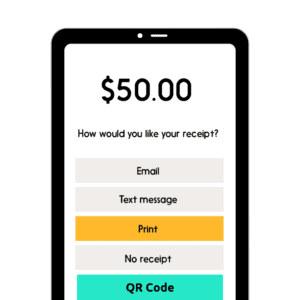
The vision: this will ubiquitously exist at all retail Point of Sale (POS) terminals (grocery stores, convenient stores, department stores, etc.) and online stores alike.
Instructions for testing the app
- Navigate to the test Shopify site: https://receiptq.myshopify.com/
- Enter the password: euldai
- Scroll down an add 2+ fake items in the catalog to your shopping cart.
- When done shopping, initiate checkout.
- Shopify will require the following items:
- Email (use your real email)
- Last Name (use any last name)
- Address (start typing any real address in the USA and it will start to autopopulate options, please choose one).
- Credit card number: 1
- Expiration Date: type any 4 digits for Month / Year later than today’s month and year (i.e. 11/29).
- Security Code: choose any 3 random digits (i.e. 333)
- Name on Card: any name
- Use shipping address as billing address: check the box
- Click the Pay Now button
- You should then be redirected to a screen with a QR code.
- Scan the QR code with your phone.
- You should then arrive at this page here: https://receipt-q-mod31f.flutterflow.app/
- Click the link that says Sign Up Here (below the Login button)
- Create an account using your real email address. You now have a live ReceiptQ account.
- Once you create the account, you will then see the items that you purchased.
- You must choose a category for each item from the dropdown menus to the right.
- Once done, please click Save order
- You will then see a list of your recent orders.
- You may then drill down on the order to see a breakdown of the items you bought within the order.
- If you wish to change the category of the item, you can click the pencil icon to edit the category.
And that’s it! You now have a digital receipt.
If you repeat the steps above and make an additional purchase, you will not have to log into the ReceiptQ app again, as long as you have not logged out.
You may also log in via desktop to monitor your purchases. The app is both mobile and desktop ready.
Benefits to you, the consumer
- No fussing with paper, be environmentally / green conscious
- No having to enter a phone number for receiving an SMS digital receipt
- No having to enter an email address to receive an email digital receipt
- Keep all receipts in 1 portal
- Categorize the receipts by line item (not just entire purchase, as with most apps)
- Monitor your expenses
- Retain your receipt safely in case you need to return the product(s).
- Capture receipts so you can write off expenses for your tax returns
- Future features:
- AI enabled categorization of each product within the purchase
- AI recommendations for how to write off certain expenses for taxes
- Gain suggestions on how to control spending
- More category offerings, or create your own category
- More
Mission: To Empower the Consumer
- Get a true grip on your spending
- Do so in an environmentally friendly manner
- Keep the process of collecting your receipts simple and frictionless